Description
What you are buying
The Starter Kit writes the quote. Complete covers the two moments that decide whether you get the job at all: the first hour after the inquiry lands, and the three weeks after the quote goes out.
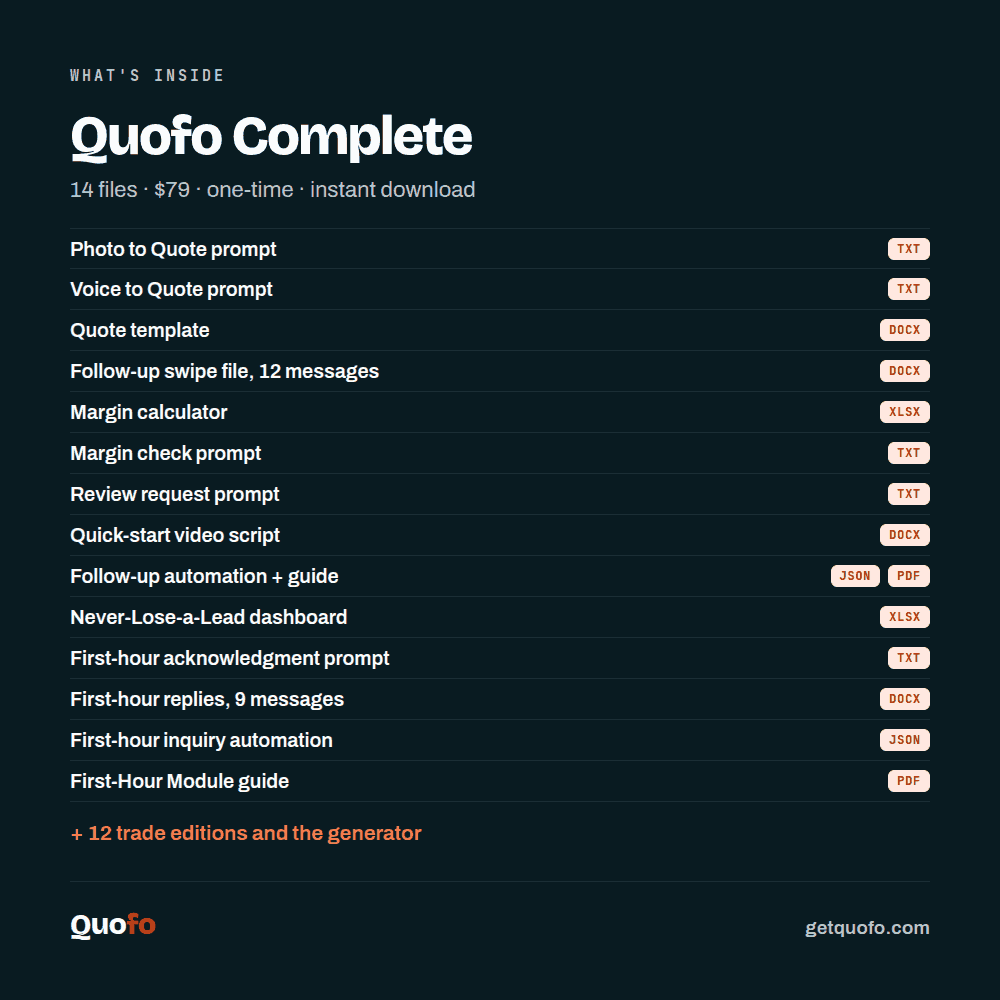
Fourteen components, one payment, no account, nothing renews.
Why Complete costs four times the Starter Kit
Straight answer: not because there are nine more files in it. Counting files is the wrong math.
Most jobs are not lost on price. They are lost because nobody answered fast enough, and because nobody chased the quote. The Starter Kit does not help you with either. Complete does, and that is what the difference in price is for.
Here is what the same capability costs on a subscription, checked August 12, 2026. At Jobber, automated quote follow-up is not in the $49 Core plan; the cheapest plan that includes it is Connect at $139 per month (getjobber.com/pricing). At Housecall Pro, the sales proposal tool — which they value at $40 per month on their own page — is only in the Max plan at $329 per month, or $299 billed annually (housecallpro.com/pricing).
Complete is $79, once. That is less than one month of the cheapest subscription plan that automates quote follow-up.
That does not make Quofo better than those platforms. They do scheduling, dispatch, invoicing and payments; Quofo does none of that. It makes the arithmetic clear.
The First-Hour Module
The follow-up rail starts after you send the quote. The First-Hour Module starts earlier, the moment the inquiry lands, which is usually while you are still on a roof or under a sink.
The research is worth stating plainly, with its date. In March 2011, Harvard Business Review published research by James Oldroyd, Kristina McElheran and David Elkington that tested 2,241 US companies with real inquiries. Average response time was 42 hours. Companies that responded within an hour were close to seven times more likely to qualify the lead than companies that took longer. It is fifteen years old and it is still the largest study on the question.
- First-response prompt (.txt) — turns an incoming inquiry into a personal reply that confirms you have it, gives a first price direction and proposes an appointment.
- Nine quick replies (.docx) — for the situations that actually come in, each in a text-message version and an email version. Copy and send from your phone.
- First-hour workflow (.json) — importable, and it fires on the incoming inquiry rather than on the sent quote.
- First-Hour Module guide (PDF) — how to set it up, how to run it without any automation at all, and when to just pick up the phone instead.
If most of your inquiries arrive as phone calls, the automation has nothing to hook onto. The nine replies and the prompt still work. The guide says so too.
Follow-up that keeps running while you are on the job
- Follow-up automation (.json) with its guide (PDF) — runs every weekday at 8am, reads your quote list, and sends the day 3, day 7 and day 14 messages. A row only goes out if the status is Open, the days open is exactly 3, 7 or 14, and there is an email address. Mark a quote Won, Lost or On hold and the follow-up stops on the next run. The guide walks through setup for someone who has never imported a workflow, and lays out a full manual route for people who would rather not automate anything.
- Never-Lose-a-Lead dashboard (.xlsx) — one row per quote, days open counting themselves, a status drop-down, colors telling you who to call today, and a win rate that calculates itself. Keep it for three months and you have your own numbers instead of a feeling.
- Follow-up swipe file (.docx) — twelve messages for day 3, day 7 and day 14, text and email versions.
The rest of the fourteen
- Photo to Quote prompt (.txt) — job photos in, complete quote out, every number left as [PRICE].
- Voice to Quote prompt (.txt) — the same quote from a two-minute voice note.
- Margin check prompt (.txt) — hand the AI your numbers and it comes back with the line items you forgot and the risks you priced at zero, before you send.
- Review request prompt (.txt) — six versions of the message that asks for a review after handover, with nothing offered in exchange.
- Quote template (.docx) — header, customer details, line items, tax line, exclusions, payment terms and acceptance block.
- Margin calculator (.xlsx) — your costs in, your floor price out.
- Quote video script (.docx) — a word-for-word script and shot plan for a ninety-second phone video you record for a specific job and send with the quote. It never names a price out loud, on purpose.
Plus START-HERE.pdf: what you have, what to do first, the common mistakes and the questions people ask.
Included free with every package: twelve trade editions, the generator and four example quotes
Twelve trade editions. Roofing, painting and decorating, landscaping, plumbing and heating (residential service work), plumbing and HVAC (full mechanical work), commercial cleaning, plastering and drywall, masonry and repointing, electrician, moving company, photographer, and carpentry and interior fit-out. Five files per trade: the photo prompt in that trade’s language and units; the exclusions list with nine exclusions that go in every time, five where the trouble usually starts and three conversations you have up front, each with the reason attached; the quote template carrying that trade’s line item descriptions; six follow-up messages for day 3, 7, 10 and 14 (the automation sends day 3, 7 and 14; day 10 you send by hand); and a two-page trade card with ten lines that always belong in a quote in that trade and five exclusions you never forget.
The trade edition generator. Eight questions about your trade, your units and the three jobs you do most, and the whole set is rewritten for you in two to five minutes. Worksheet included.
Four finished example quotes, plus a thirteen-page document showing the photos taken, the sentence typed and the follow-up messages sent for each of them.
If you would rather not automate
You do not have to. The dashboard runs the same rail by hand from a spreadsheet, and the first-hour replies work just as well pasted from your phone. Skipping the automation costs you nothing else in the package. Both workflows run on n8n. You can self-host it for free or use n8n Cloud on a paid plan; the guide covers both, and a manual route if you would rather not automate at all.
What it does not do
It does not price your job. It does not schedule, invoice, take payments or replace a site visit. It does not bring you leads — it helps you with the inquiries you already get. The automation sends only what you put into it, and you are the one who turns it on.
The setup call is not in Complete. That is Pro.
Delivery
Instant download on screen and by email. Free updates for as long as Quofo exists. Thirty days to change your mind, no form and no reason needed.
Quofo just launched
So there are no testimonials, no ratings and no results on this page. We do not have them yet and we are not going to invent them. Everything above is in the files you download.